
Learning how to mount doorbell transformer hardware is an essential step when upgrading your home security or installing a modern video doorbell. If your current chime is failing or your new smart doorbell requires more power, replacing the transformer is usually the right fix. You might feel a little nervous about handling household wiring, but this process is manageable when you take the right precautions.
Start with a direct plan and give yourself plenty of time to work carefully. We will walk you through the entire process, starting with the most critical safety checks. By the end of this guide, you will know exactly how to safely remove your old unit, install the new one, and get your doorbell system running smoothly.
Why This Task Matters
The most common reason homeowners need to replace a transformer is to support a new video doorbell. Older homes typically feature transformers designed for simple mechanical chimes, which only require a tiny burst of power when someone presses the button. Smart doorbells, however, need a constant stream of electricity to keep cameras, Wi-Fi antennas, and motion sensors running day and night. If your transformer lacks the correct voltage output, your new camera might drop offline, record incomplete videos, or fail to ring the indoor chime.
Addressing this issue ensures your home security devices work exactly as intended. Doing the task correctly also prevents electrical hazards, such as overloaded wires or short circuits, which can damage your expensive new equipment. Taking the time to properly mount and wire your new transformer gives you a reliable, safe, and fully functional entry system for years to come.
Tools or Materials You May Need
Having the right tools ready before you start prevents frustration and keeps the process moving safely. You do not need an extensive collection of specialized equipment for this task.
Here are the items you will need:
- A non-contact voltage tester
- A Phillips-head screwdriver
- A flathead screwdriver
- Wire strippers
- Electrical wire nuts (usually included with the new transformer)
- A flashlight or headlamp (optional, but highly recommended for dark areas)
- Your new compatible doorbell transformer
Before You Begin
Before you begin, make sure you know exactly where your current transformer is located. Builders often install them in utility rooms, basements, attics, or inside the garage near the main electrical panel. Once you locate it, clear the area so you have enough room to stand and work comfortably.
Start with the safest and simplest check, which is turning off the power. You must turn off the main circuit breaker that supplies electricity to the transformer. Do not attempt this project while the power remains active. Handling exposed wires with live household electricity is extremely dangerous. If you feel unsure about your home’s electrical layout or cannot verify that the power is off, stop immediately and contact a licensed electrician.
9 Effective Steps on How to Mount Doorbell Transformer
Step 1 – Locate and turn off the power
Your first step is always to head to your main electrical panel and turn off the breaker connected to the transformer. If the breaker panel lacks clear labels, you may need an assistant to stand near the doorbell while you test different switches. Once you find the correct switch, flip it to the “off” position. Keep the panel door closed afterward so nobody accidentally turns it back on while you are working.
Step 2 – Test for active voltage
Even after you flip the breaker, you must verify that the electricity is truly off. Take your non-contact voltage tester and place it near the wires connected to the existing transformer. The tester will usually beep or flash a red light if it detects any live current. Check both the thick household wires and the thinner doorbell wires. If the tester remains quiet and unlit, the area is safe to handle. If it lights up, return to the breaker panel and find the correct switch before proceeding.
Step 3 – Take a reference photo
Before unscrewing anything, pull out your smartphone and take a clear picture of the current wiring setup. You want to document exactly how the black, white, and green wires connect to your home’s electrical system. Also, note how the thinner low-voltage wires connect to the front screws of the transformer. Having this visual reference helps you match the connections perfectly when you install the new hardware, taking the guesswork out of the process.
Step 4 – Disconnect the existing wires
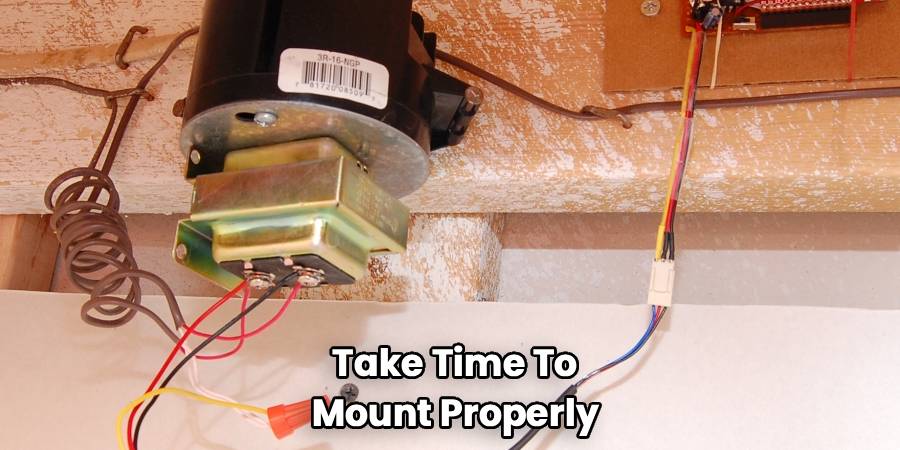
Start by loosening the small screws on the front of the transformer and pulling the thin doorbell wires away. Next, carefully untwist the wire nuts connecting the transformer to your home’s electrical supply. Separate the black (hot) wires, the white (neutral) wires, and the green or bare (ground) wires. Pull the old transformer gently away from the junction box so the wires are fully free.
Step 5 – Remove the old transformer
Transformers usually mount to the outside of a metal or plastic electrical junction box. To remove it, you will typically need to unscrew a locking nut located inside the junction box, or remove a couple of mounting screws on the outside. Hold the transformer securely with one hand while you loosen the hardware with the other. Once the locking mechanism is free, pull the transformer out of the knockout hole and set it aside.

Step 6 – Mount the new transformer
Now we reach the core of how to mount doorbell transformer hardware. Take your new transformer and thread its colored wires through the same knockout hole in the junction box. Slide the threaded base of the transformer into the hole until it sits flush against the box. Slide the new locking nut over the wires inside the box and tighten it down securely. The transformer should feel solid and should not wiggle when you gently tug on it.
Step 7 – Connect the electrical supply lines
Match the colored wires from the new transformer to your home’s electrical wires, using your reference photo as a guide. Twist the black wire to the black wire, the white wire to the white wire, and the green wire to the bare copper or green ground wire. Cap each connection firmly with a new wire nut. Gently tug on each nut to ensure the wires are locked together, then carefully tuck them back into the junction box.
Step 8 – Attach the low-voltage chime wires
Locate the two thin wires that run to your doorbell and chime. Strip a tiny bit of insulation off the ends if the copper looks worn or brittle. Wrap one wire around the left screw terminal on the front of the new transformer, and wrap the other wire around the right screw terminal. It typically does not matter which wire goes to which screw for the low-voltage side. Tighten the screws down firmly with your screwdriver.
Step 9 – Restore power and test the system
Return to your main electrical panel and flip the circuit breaker back to the “on” position. Walk over to your new transformer and listen closely; a quiet hum is normal, but you should not hear loud buzzing or see any sparks. Finally, walk to your front door and press the doorbell button. If your indoor chime rings and your smart camera powers up, you have successfully completed the installation.
Common Mistakes to Avoid
One of the most frequent errors beginners make is assuming the power is off without testing it first. Flipping a breaker is a good start, but homes are sometimes wired in confusing ways, and labels can be completely wrong. Always use a non-contact voltage tester before touching any copper wires to prevent severe electrical shocks. Taking ten seconds to test the wires can prevent a serious injury.
Another common mistake involves mixing up the high-voltage and low-voltage connections. The thick wires inside the junction box carry dangerous household electricity, while the visible screws on the outside of the transformer carry safe, low-voltage electricity. Never connect the thin doorbell wires to your home’s main electrical lines. Doing so will instantly destroy your doorbell system and create a significant fire hazard.
Finally, beginners often leave wire connections too loose inside the junction box. When you twist wires together and apply a wire nut, the connection must be tight and secure. Loose wires can spark, arc, or disconnect over time. Always give your wire nuts a gentle pull after tightening them to ensure the copper strands are locked firmly in place.
Safety Warnings
For safety, turn off power before you open any electrical boxes or touch any wires. Household electricity carries 120 volts, which is enough to cause severe injury or worse if handled incorrectly. Never attempt to work on a transformer while standing in a puddle of water, on damp concrete, or while wearing wet gloves.
If you open the junction box and notice that the wires are crumbling, charred, or melted, do not continue. These are signs of a larger electrical problem that requires professional attention. Additionally, if your home uses older aluminum wiring instead of copper, you must stop. Aluminum wiring requires specialized connectors and techniques to prevent fire hazards, making it unsuitable for a beginner DIY project.
When to Call a Professional
Call a professional if your home’s wiring colors do not match standard conventions (black, white, and ground). In some older homes, you might find cloth-wrapped wires, confusing colors, or multiple mystery wires stuffed into a single box. Guessing which wire does what is incredibly dangerous.
You should also contact an electrician if you finish the installation and the transformer immediately trips the circuit breaker. This indicates a dead short in the system. Persistent humming that sounds exceptionally loud, strange burning smells, or a doorbell that still refuses to work after replacing the hardware all warrant a visit from a licensed professional to diagnose the hidden issue.
Expert Tips
To make this project go smoothly, wrap a small piece of electrical tape around the base of your wire nuts after you twist them on. This extra layer of security helps keep moisture out and ensures the nut will not vibrate loose over the years.
If you are struggling to find your current transformer, look near your home’s HVAC system or water heater. Electricians frequently mount them on the side of utility lights or junction boxes in unfinished basements. If you still cannot find it, listen carefully. Have a helper press the doorbell repeatedly while you walk around the house; you can often hear a faint clicking or buzzing sound coming from the transformer when the button is pushed.
Frequently Asked Questions
Do I need to turn off the main power to the whole house?
You do not usually need to turn off the main breaker for the entire house. You only need to turn off the specific circuit breaker that supplies power to the doorbell transformer. However, if your panel is unlabelled and you cannot locate the correct switch, turning off the main power is the safest alternative.
Does it matter which low-voltage wire goes to which screw?
For standard doorbell transformers, it does not matter which of the two thin wires connects to which screw terminal. The low-voltage side uses alternating current (AC), which does not have a strict positive or negative polarity. Simply attach one wire to each screw and tighten them down.
Why is my new transformer buzzing loudly?
A very faint hum is normal for a working transformer. However, a loud buzzing or vibrating sound usually indicates a problem. It may mean the transformer is screwed too loosely to the junction box, the internal coils are defective, or the doorbell button outside is stuck in the pressed position.
Can I install a transformer outside?
Doorbell transformers should generally be installed indoors in a dry, protected environment. If you must install one outdoors, you are required to use a specially rated waterproof enclosure. Exposing a standard indoor transformer to rain or excessive humidity will cause electrical shorts and create a serious safety hazard.
How do I know what size transformer to buy?
Check the manual for your specific video doorbell or chime. Most modern smart doorbells require a transformer rated for 16 volts to 24 volts AC (VAC) and at least 30 volt-amps (VA). Buying an underpowered unit will result in dropped Wi-Fi connections and poor video quality.
Conclusion
Upgrading your home’s security system often starts at the front door, and ensuring your equipment has the right power supply is a vital part of the process. Understanding how to mount doorbell transformer hardware allows you to install video doorbells safely without risking damage to your expensive new cameras. While working with household wiring demands respect and caution, following basic safety rules—like shutting off the power and testing for live voltage—makes the job entirely manageable.
If this does not work or if you ever feel uncomfortable with the wiring, the safest next step is simply to call a local electrician. By approaching this project calmly and methodically, you will secure your home, power your devices properly, and gain a bit of practical DIY confidence along the way.

