
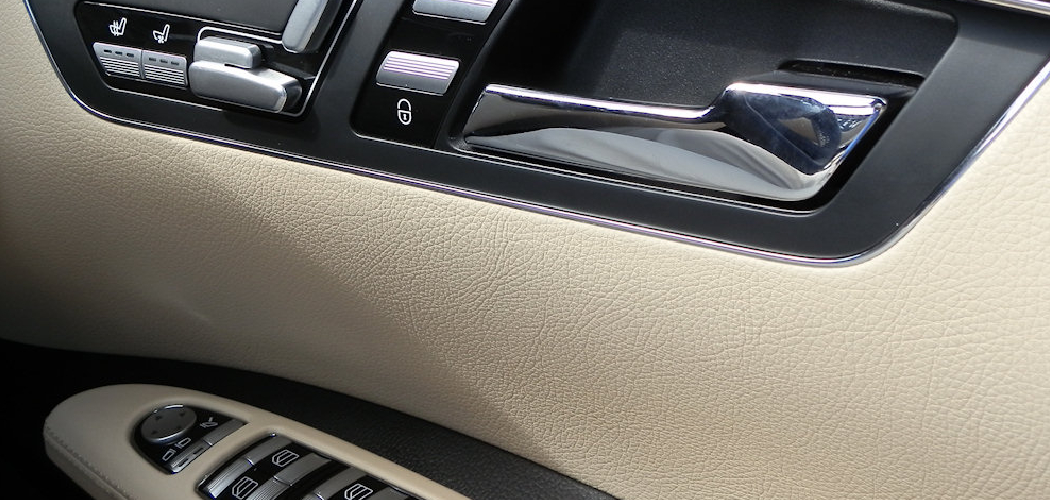
Modern vehicles come equipped with a wide array of automated features designed to keep us safe and secure, but sometimes these features can feel more like a hindrance than a help. One such feature is passive door locking, which automatically locks your vehicle when you walk away with the key fob or after a specific amount of time passes.
While this is excellent for security, it can be frustrating if you constantly need to access your car in your garage or if you worry about locking your keys inside. Understanding how to turn off passive door locking gives you the freedom to control exactly when your vehicle secures itself. In this guide, we will walk you through the process so you can customize your driving experience to better suit your daily needs.
Why Customize Your Vehicle’s Locking System
Taking control of your vehicle’s automated settings is about more than just convenience; it is about tailoring the machine to your specific lifestyle. Passive locking systems are engineered with a safety-first mindset, assuming that every time a driver exits the vehicle, they intend for it to be secured immediately. However, this logic does not apply to every situation. For parents loading groceries, pet owners managing animals, or homeowners working in their driveway, an auto-locking door can become a significant nuisance.
Furthermore, there is the ever-present anxiety of accidental lockouts. While modern smart keys make it difficult to lock keys inside, technology is not infallible. Sensors can be blocked, or batteries can die, leading to situations where the car locks itself with your essentials still inside. By disabling this feature, you return to a manual method of security that relies on your deliberate action rather than a computer’s timer. This section of the guide helps you understand that changing these settings is a standard part of vehicle ownership and ensures your car behaves exactly the way you expect it to.
8 Step Methods Guide on How to Turn Off Passive Door Locking
Step 1: Consult Your Vehicle Owner’s Manual
Before you begin pressing buttons on your dashboard or key fob, the most critical first step is to locate and read your specific owner’s manual. Every manufacturer programs their safety features differently, and the terminology can vary significantly between brands. While some call it passive locking, others might label it as “Walk-Away Auto Lock” or “Smart Lock.” Your manual serves as the ultimate authority for your specific make and model.
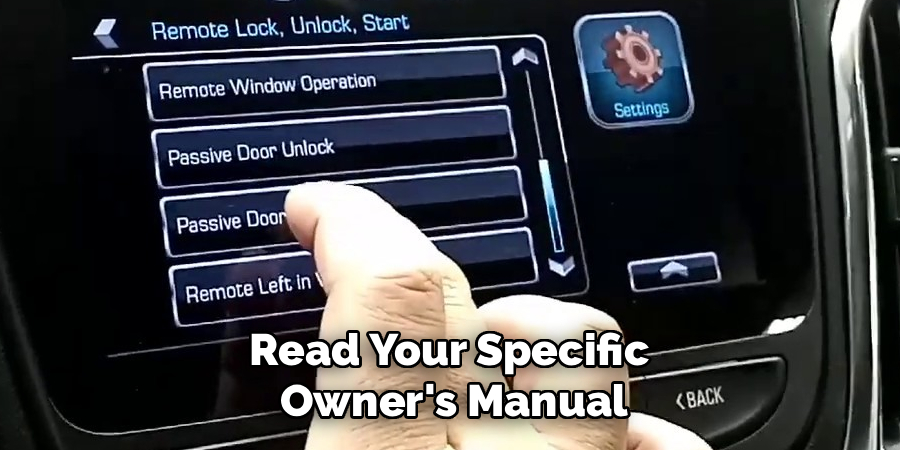
It will provide the exact menu structure you need to navigate. Reading the relevant section ensures that you do not accidentally alter other critical safety settings, such as alarm sensitivity or airbag deployment protocols. Take a few minutes to find the index, look up door locks, and familiarize yourself with the manufacturer’s recommended procedure for customizing these specific preferences.
Step 2: Ensure the Vehicle is Parked Safely
Safety is paramount when adjusting internal vehicle settings, so you must ensure the car is completely stationary and located in a safe environment. You should park the vehicle on a level surface, preferably in your driveway or a parking lot, and engage the parking brake firmly. Many vehicles will not allow you to access the detailed settings menu unless the transmission is in Park and the engine is either running or in accessory mode.
Trying to adjust these settings while at a stoplight or in moving traffic is dangerous and typically restricted by the car’s software. Once you are parked safely, turn on the ignition to the “On” or “Accessory” position. This powers up the infotainment system and the driver information center without necessarily needing the engine to be idling, allowing you to browse menus without wasting fuel.
Step 3: Access the Vehicle Settings Menu
Once your vehicle is powered on and safe to operate, turn your attention to the infotainment screen or the driver information cluster on your dashboard. You are looking for a main menu option usually labeled “Settings” or “Vehicle Settings.” In many modern cars, this is accessed via a touchscreen in the center console, but in others, you might use buttons on the steering wheel to scroll through a digital display near the speedometer.
This main menu is the gateway to all customizable electronic features in your car. Navigate through the initial options carefully. You might see categories for audio, phone, connectivity, and vehicle. Select the “Vehicle” option to proceed deeper into the system where the mechanical and safety preferences are stored. This is the area where manufacturers house the controls for lighting, locks, and remote start features.
Step 4: Locate the Power Door Locks Section
After entering the vehicle settings menu, you need to find the specific submenu dedicated to locking mechanisms. This is often labeled “Power Door Locks,” “Locking,” or “Doors and Locks.” Scroll through the list of available vehicle parameters until you find this category. It is common for this section to be hidden under a broader “Comfort and Convenience” tab in some luxury vehicles.
Once you find the correct submenu, select it to view the available toggle switches and options. This area controls everything from how the car behaves when you shift out of park to whether the horn honks when you lock the doors. It is important to move slowly here so you do not miss the specific line item you are looking for. The interface may require you to scroll down if there are many options listed.
Step 5: Identify the Passive Locking Feature
Within the locking menu, scan the list for the term “Passive Locking,” “Passive Door Lock,” or “Walk Away Lock.” This is the specific setting that dictates whether the car secures itself automatically. When you find it, you will likely see a checkbox, a toggle switch, or a selection menu next to it. Learning how to turn off passive door locking essentially comes down to this specific moment in the menu interface.
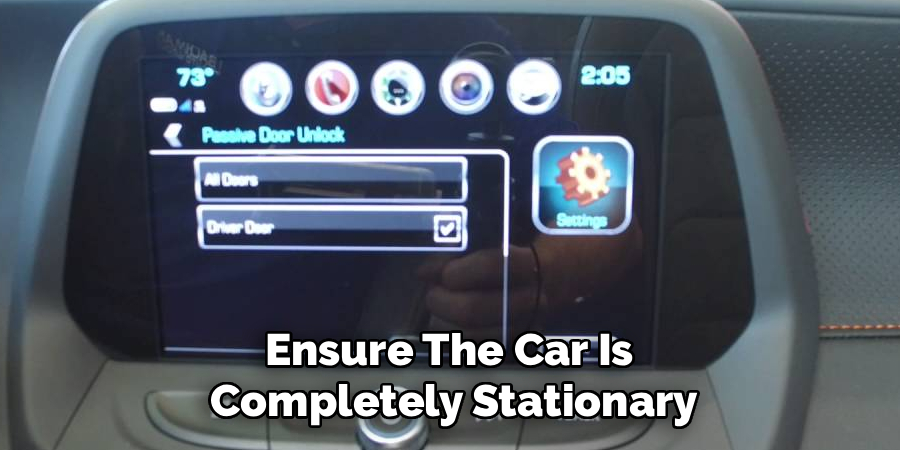
Depending on your vehicle’s software version, the setting might be set to “On,” “On with Horn Chirp,” or “Off.” If the feature is currently active, it will be highlighted or checked. Understanding this menu is key because you might also see options for “Passive Unlocking,” which is a different feature entirely. Ensure you are focused on the locking function to prevent the car from securing itself without your command.
Step 6: Disable the Setting and Confirm
Now that you have isolated the correct setting, change the selection to “Off” or uncheck the box. Some systems may ask for confirmation to ensure you really want to deactivate this security feature. If a prompt appears on the screen asking you to save the changes, be sure to select “Yes” or “Save.” Without this confirmation, the system might revert to the previous state once you exit the menu.
After you have made the change, the toggle should appear grayed out or the checkmark should disappear. This visual confirmation indicates that the passive locking protocol has been suspended. The computer in your car has now been instructed to wait for a manual signal—from either the fob button or the door handle sensor—before locking the doors.
Step 7: Test the New Configuration
Do not assume the process is complete just because you changed a setting on a screen. You must physically test the vehicle to ensure the programming update took effect. Turn the vehicle off, exit the car with your key fob, and close all doors firmly. Walk away from the vehicle to a distance where the passive lock usually engages—typically about ten feet.
Wait for the amount of time it usually takes for the horn to chirp or the lights to flash. If the vehicle remains unlocked, you have successfully completed the change. Walk back to the car and try to open the door. It should open freely without you needing to touch the sensor or press the unlock button. This practical test confirms that the car is no longer auto-locking and relies on you to lock it manually.
Step 8: Check Key Fob Settings
In some rare instances, the vehicle settings menu on the dashboard is overridden by settings stored on the specific key fob you are using. If the dashboard method did not work, or if you are wondering how to turn off passive door locking using a different approach, check your key fob for specific button combinations.
Some manufacturers allow you to change preferences by holding down the lock and unlock buttons simultaneously for several seconds. If your car has a “Driver 1” and “Driver 2” memory system, you may need to repeat the settings change for the second key fob as well. This ensures that no matter which set of keys is used to start the car, the passive locking feature remains disabled for all drivers.
Re-verify After Software Updates
Modern vehicles often receive over-the-air software updates or firmware refreshes during service appointments at the dealership. These updates can sometimes reset your customized preferences back to the factory defaults. If you notice your car has started locking itself again unexpectedly, you do not need to panic. Simply repeat the steps outlined above.
It is a good habit to periodically check your vehicle settings menu, especially after a major service or a battery change. Keeping an eye on these settings ensures that your vehicle continues to behave according to your preferences. If the setting seems to be permanently grayed out or inaccessible after an update, you may need to contact your dealership for clarification on the new software architecture.
Establish a New Locking Routine
Now that you have successfully disabled the automatic locking feature, you must adjust your personal habits to ensure your vehicle remains secure. You no longer have the safety net of the car locking itself if you forget. You must make a conscious effort to press the lock button on your key fob or the door handle every time you walk away.
Developing this muscle memory is crucial for the safety of your belongings. While disabling the feature adds convenience, it shifts the responsibility of security entirely back to you. Take a few days to be hyper-aware of your parking routine. Listen for the sound of the locks engaging when you press the button, and visually confirm the lights flash before you walk away to ensure your vehicle is safe.
Frequently Asked Questions
Will Disabling Passive Locking Affect My Car Alarm?
Disabling the passive locking feature generally does not turn off your car alarm or theft-deterrent system. The alarm system is typically armed whenever the doors are locked electronically, regardless of whether that signal comes from the automatic timer or your manual button press. However, because the car will not lock itself, the alarm will not arm until you manually lock the vehicle. You must remember to lock the car every time you leave it to ensure the security system is active and protecting your valuables.
Why Is the Passive Locking Option Grayed Out?
If you navigate to the menu and find the option is visible but cannot be changed, it is usually due to a safety interlock. The vehicle often prevents changes to door lock settings while the car is in motion or if a door is currently open. Ensure your vehicle is in Park, the engine is on (or in accessory mode), and all doors are fully closed. If the option remains unavailable, there may be a restriction set by a teen-driver key or valet mode that limits setting changes.
Can I Set Passive Locking to Only Alert Me?
Some advanced vehicle systems allow for a middle ground where the car does not lock but alerts you that you have walked away with the vehicle unlocked. This is often called a “Door Ajar” or “Unlock Alert” setting. You will need to explore your specific manufacturer’s menu to see if this hybrid option exists. It can be a great compromise for those who want the convenience of an unlocked car in the garage but want a reminder if they leave the car in a public parking lot.
Does This Process Void My Warranty?
Adjusting user-accessible settings like passive door locking does not void your vehicle warranty. These menus are designed by the manufacturer specifically for owner customization. You are simply toggling a preference that the engineers included for your convenience. However, you should avoid using third-party coding tools or hacking software to force changes that are not available in the standard menu, as modifying the vehicle’s electronic control unit (ECU) with unauthorized equipment could potentially cause warranty issues regarding the electrical system.
What If My Car Does Not Have a Screen?
If your vehicle lacks an infotainment screen, the process involves using the instrument cluster buttons or specific key fob sequences. You will likely use the trip odometer reset stem or buttons on the turn signal lever to scroll through a small LCD screen near the speedometer. The process is similar in logic—finding the vehicle settings and toggling the lock option—but the interface is much smaller. Referencing the owner’s manual is even more critical in these cars, as the menu icons can be cryptic and harder to decipher without a guide.
Conclusion
Taking charge of your vehicle’s settings allows you to create a driving experience that fits your life, rather than forcing you to adapt to the car’s default programming. We hope this guide has made the process of customizing your security features straightforward and stress-free. By following these steps, you can prevent accidental lockouts and enjoy easier access to your vehicle when you need it most.
Now that you know how to turn off passive door locking, you can confidently manage your car’s security, ensuring that your vehicle remains accessible when you are working nearby and secure only when you decide it should be. Remember to establish a strong manual locking habit to keep your vehicle safe in the future.

