
You’re standing in your kitchen when it happens. Your bag slips off your shoulder, hits the floor, and suddenly a 130-decibel shriek fills the room.
Your personal alarm keychain went off by accident.
Your ears ring. The dog bolts. Your neighbor bangs on the wall. And you’re fumbling with a tiny device, pressing everything, with no idea how to make it stop.
You bought this alarm to feel safe, not to trigger a panic in your own home.
The good news is that turning it off is simple once you know how. In this guide, you’ll learn exactly how to turn off personal alarm keychain, no matter which type you own. You’ll see the shutoff method for each design, the mistakes that keep the noise going, and answers to the questions people ask most.
Let’s silence it.
How to Turn Off Personal Alarm Keychain Actually Work
Before you can turn one off, it helps to know what’s happening inside.
A personal safety alarm keychain is a small, battery-powered device that makes a loud sound when triggered. That sound draws attention and scares off a threat. Most models hit 120 to 140 decibels — about as loud as a jet engine at takeoff.
The trigger is what matters here.
Most keychain alarms use one of three trigger types:
- Pin-pull alarms sound when you pull a pin or plug out of the body.
- Button alarms sound when you press and hold a button.
- Switch or slide alarms sound when you flip a switch to the “on” position.
Each trigger has a matching keychain alarm shutoff method. Pull the pin? You reinsert it. Held a button? You press it again. Flipped a switch? You flip it back.
Here’s the part people miss.
The reset method is tied to the trigger type. If you don’t know which type you own, you’ll keep pressing the wrong thing while the alarm keeps screaming.
In short: every alarm turns off by reversing whatever action set it off.
Turning Off Your Personal Alarm Keychain by Type
Now let’s get to the fix. Find your alarm type below and follow the steps.
Pin-Pull Alarms
This is the most common design. A small pin or plug sits in the top or side of the alarm, often attached to a wrist strap or keyring.
When the pin comes out, the alarm sounds. That’s it.
To turn it off:
- Find the pin or plug that came loose. It’s usually dangling from a short cord.
- Line it up with the small hole on the alarm body.
- Push the pin firmly back in until the sound stops.
- Give it a gentle tug to confirm it’s seated. It should stay put and stay silent.
If the noise stops the moment the pin goes in, you’ve done it right.
Warning: Keep the pin attached to its strap. If you lose the pin, some alarms can’t be reset at all until you find a replacement.
Button-Press Alarms
These alarms have a single button, usually marked or slightly raised. You press and hold to sound it, and you press again to stop it.
To turn it off:
- Locate the main activation button.
- Press and hold it for two to three seconds.
- Wait for the sound to cut out completely.
- Release the button.
Some button models need a double press instead of a hold. If a single press won’t work, try pressing twice quickly.
Switch or Slide Alarms
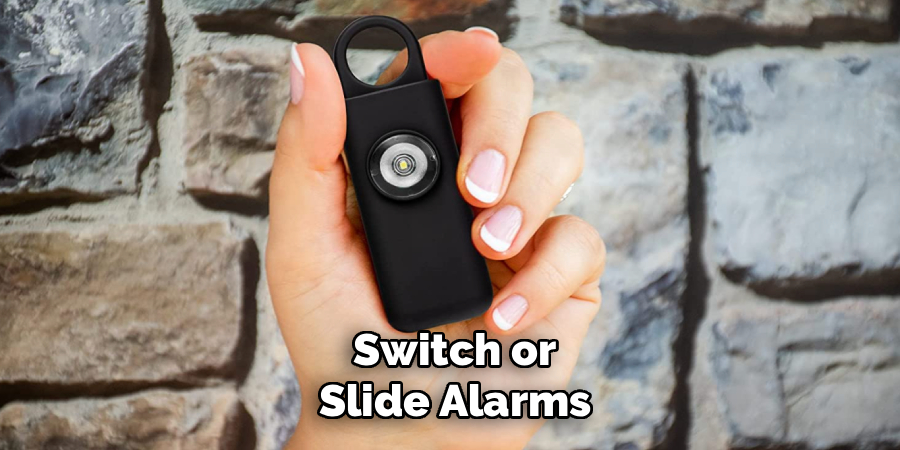
These have a physical switch, slider, or toggle on the side or back. The alarm sounds while the switch sits in the “on” position.
To turn it off:
- Find the switch or slider on the body.
- Move it firmly to the “off” position — usually toward a marked line or dot.
- Confirm the sound stops fully.
If the switch feels stuck, don’t force it sideways. Slide it straight along its track.
App-Connected Alarms
A few newer models pair with a phone app. These often have a physical button plus an app control.
To turn it off:
- Try the physical button first, since it’s fastest.
- If it won’t stop, open the companion app.
- Look for a “Silence” or “Turn Off” option and tap it.
- Check that the app shows the alarm as disarmed.
In short: match your alarm type to its shutoff, and the noise stops in seconds.
Comparing Alarm Types and Shutoff Methods
Not sure which type you have? This table breaks down each one so you can spot yours fast.
| Alarm Type | How to Turn It Off | Ease of Shutoff | Best For |
| Pin-pull | Reinsert the pin | Easy — if you keep the pin | People who want instant, reliable silence |
| Button-press | Hold or double-press the button | Medium — timing matters | Users who worry about accidental pin loss |
| Switch/slide | Flip the switch back to off | Very easy | Anyone who wants a simple, tactile control |
| App-connected | Physical button or app | Harder — depends on phone | Tech-savvy users who want extra features |
Read this before you buy your next one.
If you tend to lose small parts, a switch or button alarm saves you the panic of a missing pin. If you want the loudest, most instant deterrent, a pin-pull alarm is hard to beat.
In short: the best alarm is the one you can silence without thinking twice.
What to Do If the Alarm Won’t Stop
Sometimes you do everything right, and the sound keeps going. Don’t panic. Work through these steps in order.
First, muffle the sound while you troubleshoot. Press the alarm against a thick towel, pillow, or your body. This won’t fix it, but it buys your ears some relief.
Then try these:
- Reinsert the pin fully. A half-seated pin often keeps the alarm active. Push until it clicks or stops.
- Hold the button longer. Some models need a full three-second hold, not a quick tap.
- Check the switch position. Make sure it sits all the way in the off slot, not halfway.
- Remove the battery. If nothing else works, open the battery compartment and pull the battery out. This is your last resort, but it always works.
To remove the battery, look for a small panel on the back. You may need a tiny screwdriver or a coin to open it. Slide the panel off and lift the battery out.
In short: if the shutoff fails, cutting the power always wins.
How to Prevent Accidental Activation
The best fix is never setting it off by mistake. A few habits keep your personal alarm keychain quiet until you truly need it.
- Store it pin-side up in your bag so the pin can’t snag and pull loose.
- Use the safety clip if your model has one. It blocks accidental button presses.
- Keep it in an outer pocket, not buried under keys and coins that press the button.
- Check the pin cord now and then. A frayed cord pulls out too easily.
Test your alarm once a month.
Give it a quick, controlled trigger somewhere private, then turn it off right away. This confirms the battery works and keeps you familiar with the shutoff. A safety tool you can’t operate under stress isn’t protecting you.
In short: smart storage and a monthly test stop most false alarms before they start.
Common Mistakes and Troubleshooting
Turning off a keychain alarm seems obvious — until it’s shrieking and your hands are shaking. Here are the errors that trip people up most, why they happen, and how to fix each one for good.
Mistake 1: Pressing the Wrong Part
You jab at every button and edge, and the alarm keeps blaring.
Why it happens: In the panic of a loud, sudden noise, people forget which trigger their alarm uses. They press a decorative light or logo instead of the real control.
The fix: Learn your alarm type before an emergency. Practice the shutoff twice when you first buy it, so your fingers know the motion by heart.
Mistake 2: The Pin Isn’t Fully Seated
You slide the pin back in, but the alarm stays loud or restarts a second later.
Why it happens: A pin that sits only partway in doesn’t complete the circuit that silences the alarm. It looks connected but isn’t.
The fix: Push the pin in with firm, steady pressure until the sound stops completely. Then tug gently to confirm it holds. If it pops out, the cord or pin may be worn and need replacing.
Mistake 3: Ignoring a Dying Battery
Your alarm sounds weak, won’t turn off cleanly, or won’t sound at all.
Why it happens: A low battery can’t power the shutoff circuit properly. The alarm behaves erratically, sometimes chirping or fading instead of stopping.
The fix: Replace the battery as soon as the volume drops. Keep a spare of the correct size — usually small button cells — so a dead battery never leaves you stuck.
Mistake 4: Losing the Pin Entirely
The pin pulls free, rolls under a car, and now nothing silences the alarm.
Why it happens: The pin is small and often attached by a thin cord that snaps. Once it’s gone, a pin-pull alarm has no reset.
The fix: Pull the battery to stop the noise immediately. Then contact the maker for a replacement pin, or keep the strap secured to a keyring so the pin can’t wander off.
Mistake 5: Forcing a Stuck Switch
You shove the switch sideways, and it jams or breaks.
Why it happens: Dirt, lint, or pocket grime clogs the switch track. Sliding it at an angle bends the mechanism.
The fix: Slide the switch straight along its channel with even pressure. If it’s dirty, wipe the track with a dry cloth. Never pry it with a sharp tool.
Mistake 6: Not Testing Before You Rely on It
The one time you need it, you fumble and can’t shut it off.
Why it happens: People buy the alarm, drop it in a bag, and never touch it again. Under real stress, the unfamiliar controls feel impossible.
The fix: Test the alarm monthly. Sound it, silence it, and check the battery. Familiar hands stay calm hands.
In short: most alarm problems come from a loose pin, a dead battery, or simple unfamiliarity — all easy to prevent.
Frequently Asked Questions
How do you turn off a personal alarm keychain that keeps going off?
First, figure out your trigger type. Reinsert the pin, hold the button for three seconds, or slide the switch to off. If none of that works, open the back panel and remove the battery — that stops any alarm instantly.
Why won’t my keychain alarm turn off even after I put the pin back?
The pin probably isn’t seated all the way. Push it in firmly until the sound stops fully, then tug to confirm it holds. If it still won’t silence, a low battery may be the culprit, so try replacing it.
Can I turn off a personal safety alarm keychain without the pin?
Yes. If you’ve lost the pin, open the battery compartment on the back and remove the battery to kill the sound. Then order a replacement pin from the maker, since a pin-pull alarm won’t reset properly without one.
How do I stop my alarm keychain from going off by accident?
Store it with the pin facing up so it can’t snag, and use the safety clip if your model has one. Keep it in an outer pocket away from keys and coins that could press the button.
Do personal alarm keychains turn off on their own?
Some models stop after a set time, often 30 to 60 minutes, to protect the battery. Most, though, keep sounding until you manually reset them. Don’t count on it stopping by itself — always know your shutoff method.
Wrapping Up
An accidental alarm is startling, but silencing it is easy once you know the trick.
You’ve learned how to turn off a personal alarm keychain for every type — reinsert the pin, hold or double-press the button, flip the switch, or pull the battery as a last resort. You also know the common mistakes, like a half-seated pin or a dying battery, and how to fix each one. A quick monthly test keeps you confident and ready.
Your alarm is there to protect you, and now you’re fully in control of it.
Want to get even more from your safety gear? Check out our guide on [related topic: choosing the right personal safety alarm] next.

About
Robert D is a distinguished figure in the world of Safety Systems and Risk Management, with a decade of expertise creating innovative and sustainable workplace solutions. His professional focus lies in merging traditional safety protocols with modern digital monitoring techniques, fostering environments that are both practical and hazard-conscious. As the lead author of SafetyRift, Robert delves into the art and science of risk mitigation, inspiring safety officers and industry professionals alike to bridge the gap between compliance and culture.
Education
RMIT University (Melbourne, Australia)
Associate Degree in Design (Industrial Safety)
-
Focus on sustainable safety infrastructure, industry-driven risk assessments, and practical implementation.
-
Gained hands-on experience with traditional hazard identification and digital monitoring tools, such as IoT safety sensors and predictive analytics software.
Nottingham Trent University (United Kingdom)
Bachelor’s in Occupational Health and Safety (Honors)
-
Specialized in systemic design with a focus on blending human behavior psychology with modern safety production techniques.
-
Participated in industry-wide projects, working with global logistics and manufacturing firms to gain real-world insights into large-scale safety deployments.
Publications and Impact
In SafetyRift, Robert shares his insights on safety design processes, protective materials, and strategies for efficient, accident-free production. His writing bridges the gap between foundational safety knowledge and modern industrial needs, making it a must-read for both budding safety coordinators and seasoned risk management professionals.
